A free WordPress resume theme that prints to one page
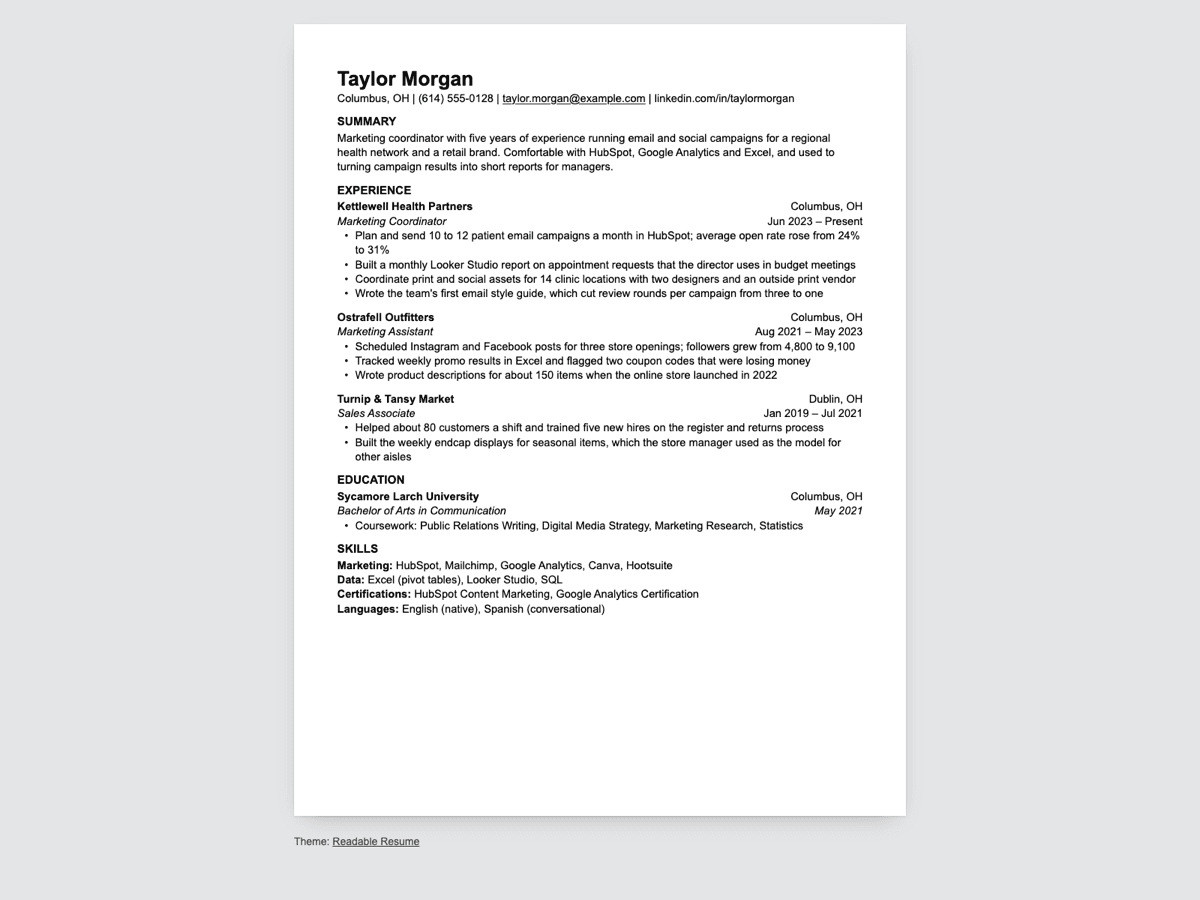
Readable Resume is a block theme that puts our Plain template on your own WordPress site. You edit the resume in the block editor and print the same page to a PDF.
What you get
- A one-page resume pattern made of ordinary blocks, with a sample to replace.
- A Resume template that hides the site header and prints with 0.6 inch margins on US Letter or A4.
- The same plain type for the rest of the site: posts, pages, archives and search.
- Free, under the GNU GPL, version 2 or later.
The theme isn't in the WordPress.org theme directory yet. It will be listed there once its review is done.
Install it
Once the theme is listed in the WordPress.org theme directory, you'll install it from your dashboard: Appearance > Themes > Add New Theme, search for Readable Resume, then Install and Activate.
It needs WordPress 6.6 or later and works with the block editor. It doesn't need any plugins.
Make your resume
- Go to Pages > Add New Page and pick One-page resume from the patterns that open with the new page. If they don't open, click the + button, open the Patterns tab and look under Resume.
- Replace the sample text with your own. Each job is a group with three parts: the company and place, your title and dates, and the bullets. Duplicate a group to add a job, or delete one to remove it.
- In the page settings on the right, change Template to Resume. It hides the site header and the page title and draws the page as a sheet of paper.
- Publish. To make the resume your home page, go to Settings > Reading, choose A static page and pick it.
Print it to PDF
Open the published page in Chrome or Edge and press Ctrl+P (Cmd+P on a Mac). Set Destination to Save as PDF, pick Letter or A4 under Paper size and turn off Headers and footers under More settings. Leave Margins on Default: the theme sets 0.6 inch margins itself. The print preview shows the page count; if your resume runs onto a second page, cut a few bullets first. Our guide to keeping a resume to one page has more ways.
What a parser reads from the PDF
We printed the sample page from Chrome 156 to US Letter and A4 and ran both PDFs through the checks we use for our Google Docs templates. OpenResume, the open-source parser behind our ATS resume checker, read 33 of 33 fields on Letter and 33 of 33 on A4. Both PDFs were one page, with the text in reading order, Arial embedded and the lines breaking in the same places as in the Google Docs version. Checked October 29, 2026 with theme version 1.0.0 on WordPress 7.1.3. How we test explains the checks.
The layout is one column of text with no text boxes on purpose. In our ATS parsing test, putting the contact details in a text box cost 12 of 46 fields, and a two-column layout cost 4. That test used one parser, and a field it misreads isn't the same as a rejected application, but the causes are worth avoiding.
The Google Docs and Word version
The same layout is our Plain resume template, as a Google Doc and a .docx for Word, with a matching cover letter and references page in US Letter and A4. Use the theme if you want your resume on your own site and a PDF from the same page. Use the Doc if an application asks for a Word file, or if you want someone to leave comments on it. The theme copies the Doc's sizes: Arial at 11 pt, a 20 pt name and section headings in capitals.
Want a different look? Every resume template on this site is one column with real text, in Google Docs and Word.
License
Readable Resume is free software under the GNU General Public License, version 2 or later, the same license as WordPress. You can use it, change it and share it. The person, companies and school in the sample are made up. The Google Docs and Word files of Plain stay under our terms.
WordPress is a trademark of the WordPress Foundation. ReadableResume is not affiliated with or endorsed by the WordPress Foundation.
Questions
- Is the resume a custom block?
- No. It's a pattern made of core blocks: headings, paragraphs, lists and groups. If you switch themes later, your text stays on the page.
- Can I use a different font?
- Yes. Open Appearance > Editor > Styles > Typography. The theme comes with Arial and Georgia. In Arial, the sample breaks its lines in the same places as the Google Docs version.
- Do I have to use the Resume template?
- No, but it's the one meant for printing. On the default page template, the site header and the page title show above the resume and end up in the PDF.
- Does the theme collect any data?
- No. It doesn't set cookies or load files from other sites. Comment avatars come from Gravatar through WordPress itself, and you can turn them off under Settings > Discussion.